v2.0.0 · MIT · macOS and Linux · Podman

Give the agent your code.
Not your machine.

Lyngvi is a hardened, agent-agnostic sandbox for running autonomous coding agents against your own repositories. You drive it from a desktop app — the conversation, the diff and the delivery in one window — or from the command line, which is the same product without the window. The agent gets a working copy, a toolchain and a controlled way out. It never gets your credentials, your git history or a route to the internet.

  • 0 direct network routes out of the container
  • 1 container per conversation
  • 3 buckets every changed file is classified into
Lyngvi — Agentic coding
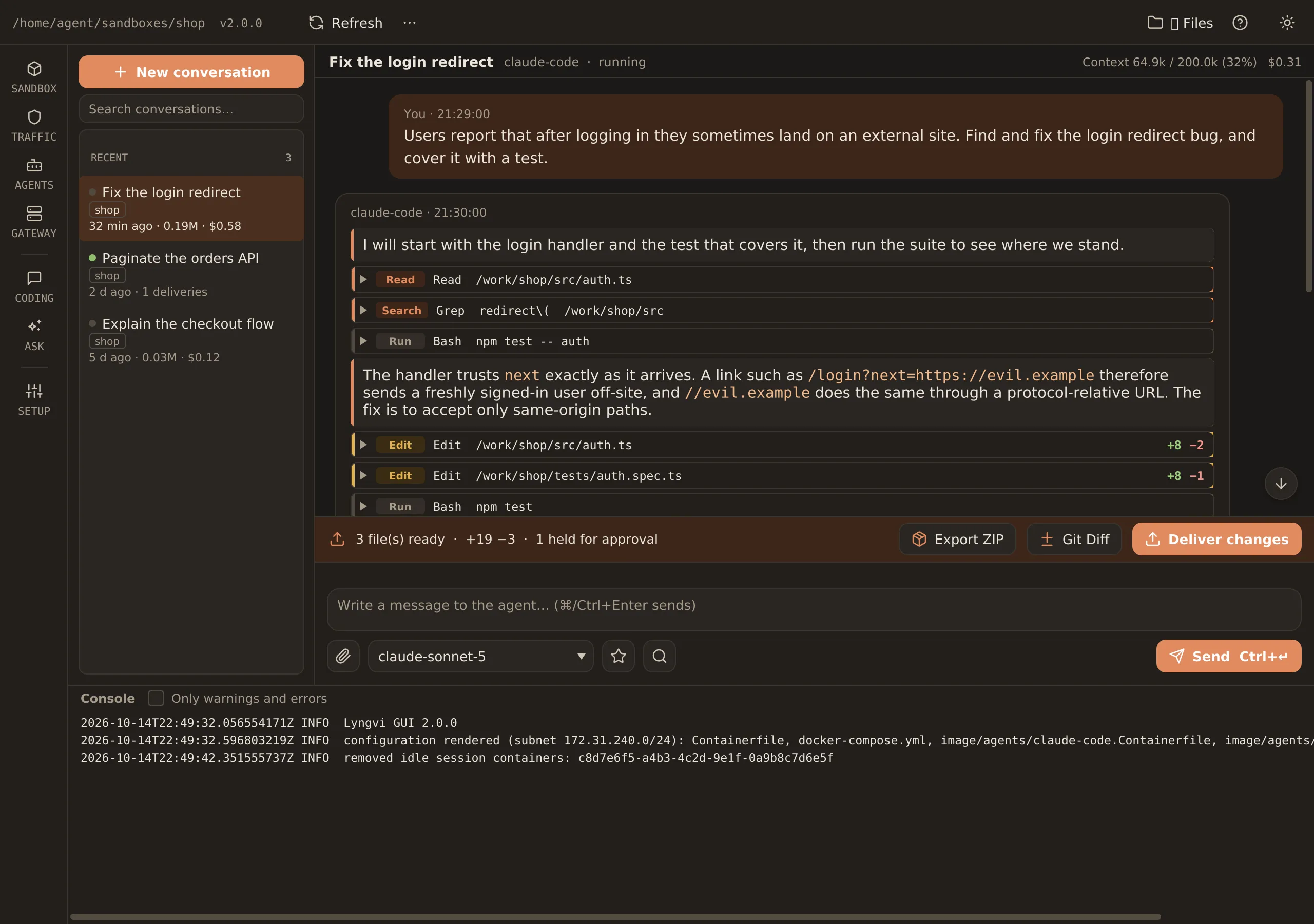
The Lyngvi desktop app: conversations on the left, and a transcript where the agent’s work is listed as Read, Search, Run and Edit rows with line counts on each edit.
The app: a conversation per task, the agent’s work as it happens, and the bar above the composer saying what is waiting to be delivered — three files, one of them held back.

Everything the app does is also a command. The CLI ships inside the app and in a package of its own, and both call the same core:

a first run, start to finish
./setup.sh --sandbox ~/sandboxes/shop init --repo ~/src/shop✔ sandbox created · profile "default" · 1 repository./setup.sh build && ./setup.sh up✔ localhost/lyngvi-base:2.0.0✔ proxy and gateway up on 10.89.3.0/24 (internal)./setup.sh session new --title "Fix the login redirect" --preset dev✔ session 7f3a2c · container lyngvi-shop-7f3a2c · 8g / 4.0 cpusecho "Find and fix the login redirect bug" | ./setup.sh session ask 7f3a2c  … reading src/auth.ts, running the test suite  ✗ DENIED api.telemetry.example → not on the allowlist  3 files changed, tests green./setup.sh session review 7f3a2c  apply    src/auth.ts            +12 −3  apply    tests/auth.spec.ts     +58 −0  hold     bin/run.sh             EXECUTABLE  reject   ../secrets.env         PATH_TRAVERSAL./setup.sh session apply 7f3a2c --branch agent/fix-login✔ 2 files committed on agent/fix-login

Named after the island in Norse mythology where the wolf Fenrir was bound: a place where great power is kept within defined boundaries.

github.com/joachimhs/lyngvi

The desktop app

The whole product, in one window

Making a sandbox, talking to the agent, reading the diff and delivering what you approve are all in the app, and none of it needs the terminal. Every screen below is the real JavaFX app, run against a sandbox with one repository, three conversations and a change waiting to be reviewed. No mock-ups, no retouching.

Lyngvi — Agentic coding
The Agentic coding screen: a conversation list on the left and a transcript where the agent’s tool calls are listed as Read, Search, Run and Edit rows.

A conversation is a work log

Every reply shows what the agent read, searched, ran and edited — with +/− counts on each edit — and what the turn cost in tokens and dollars. The strip above the composer says what is waiting for delivery, and that one file is held back.

Lyngvi 2.0.0 · dark theme · sandbox «shop»

The four premises

The product is the boundary

Everything else in Lyngvi is shell around these four. They are the reason an agent can run unattended in a repository you care about.

No direct network access

The session container sits on an internal network with no default route. Every outbound connection goes through a Squid proxy with an allowlist, and an explicit blocklist of known exfiltration endpoints is evaluated first.

squid · allowlist + blocklist

No access to your .git

The agent works in a copy with a fresh .git — no hooks, no config, no remotes, no credential helper. The whole git attack surface is removed structurally, not by policy.

copied working tree

Secrets live in a gateway sidecar

Internal systems are reached through a read-only, allowlisted API that holds the token. The agent only ever sees a hostname. A plugin cannot read the secret: the runtime injects it into a locked upstream object.

never a token in the container

Validated, human-approved delivery

Changes come back as a patch, classified on the host file by file, reviewed by you, and committed to a working branch. Never to main, never silently.

apply · hold · reject

Architecture

One core, two front-ends, three layers of containment

All logic lives in a Java core that both the CLI and the JavaFX GUI call in-process. The core is the only thing that talks to git and Podman. Select a part of the diagram to see what it guarantees.

Your machine
Shared stack (podman compose)

internal network · no default route

One container per conversation

Inside the sandbox

A complete workspace, and nothing more

The agent gets a real development environment — git, a toolchain, a package registry through the proxy — with a strictly bounded view of the world.

What the agent sees

Mounted into the container, and nothing else from the host:

  • /work/<repo> a working copy with a fresh .git, one mount per repository
  • /work/output files meant for you, outside the repositories
  • /work/_attachments files you sent with a message, read-only
  • /work/AGENTS.md the house rules, generated from the sandbox config
  • HTTP_PROXY, HTTPS_PROXY the only way out, to the allowlist
  • <SYSTEM>_GATEWAY_URL a hostname per configured internal system
What it never sees

Structurally out of reach, not merely discouraged:

  • Your .git — hooks, config, remotes, credential helpers
  • Anything else on your filesystem; no home directory, no SSH keys
  • The host machine or services on its localhost
  • A token for an internal system — the gateway holds those
  • sudo, new privileges or any Linux capability
  • A default route: unknown hosts fail at the proxy, not at your firewall

Agents are interchangeable

Claude Code and OpenCode ship as reference adapters, with subscription login or a token. An adapter is an agent.json plus a command contract, so a third agent is a config file, not a fork. Models running on your own machine (Ollama, LM Studio, MLX) are reached through the proxy on the ports your profile names.

  • Claude Code subscription, token or API key · streaming · reasoning · attachments
  • OpenCode subscription or key · streaming · local and hosted models
  • Your own agent.json, or an adapter.sh in any language

Egress control

Every request the agent makes, answered by a list you own

The blocklist is evaluated first, then the allowlist; anything that matches neither is denied. Try a hostname and see what the proxy would answer.

Examples:
ALLOWED — on the allowlist registry.npmjs.org profile

Allowed by the profile your organisation ships.

Live from the command line: ./setup.sh domain add registry.npmjs.org ./setup.sh domain blocked --follow

The bundled blocklist, by category

  • Request capture webhook.site · pipedream.com · requestbin.com · beeceptor.com
  • Paste sites pastebin.com · hastebin.com · rentry.co · dpaste.org
  • File sharing transfer.sh · file.io · 0x0.st · catbox.moe · gofile.io
  • Tunnels ngrok.io · localtunnel.me · serveo.net · localhost.run
  • IP reconnaissance ipinfo.io · ifconfig.me · icanhazip.com · ipify.org

allowed-domains.txt

  • profile registry.npmjs.org
  • agent api.anthropic.com · claude.ai · console.anthropic.com · platform.claude.com · statsig.anthropic.com · models.opencode.ai …
  • yours github.com · deb.debian.org · repo.maven.apache.org
Lyngvi — Traffic
The Traffic table in the GUI: four denied hosts with status 403 and their counts, and the buttons Allow, Refresh, Follow and Stop.
In the GUI the same list is a table: every host the proxy denied, with a count, and an Allow button that adds it to your section of the allowlist and reloads the proxy.

Delivery

Nothing leaves the sandbox unseen

A delivery is measured from a baseline — the session start, the last delivery, or any delivery in between — built into a patch inside the container, and then classified on the host. Classification is yours, not the agent’s.

  1. 01

    Baseline

    Pick where the diff starts: session start, the last delivery, or an earlier one.

  2. 02

    Patch

    Built with a throwaway index, so uncommitted, unstaged and agent-committed work all come along.

  3. 03

    Classify

    Three buckets on the host, by rule: apply, hold, reject.

  4. 04

    Review

    File by file, as hunks or whole files, in the GUI or the CLI.

  5. 05

    Branch

    Commit or stage on a working branch. Protected branches are refused.

session review 7f3a2c Click a held file to include it — held files are only delivered when you name them.
FileChangeBucket
src/auth.ts modified +12 −3apply
src/session/cookie.ts modified +4 −1apply
tests/auth.spec.ts added +58 −0apply
bin/run.sh EXECUTABLEadded mode 100755hold
docs/screenshot.png BINARYadded binaryhold
../secrets.env PATH_TRAVERSALadded +1 −0reject
./setup.sh session apply --branch agent/fix-login

3 files will be committed on agent/fix-login.

main, master and develop are refused by the profile; the branch prefix is yours to set.

  • apply

    Ordinary text changes, applied when you approve them.

  • hold

    Executables, symlinks, binaries and oversized files. Delivered only when named explicitly.

  • reject

    Path traversal, absolute paths, .git segments, invalid UTF-8, unparseable patches. Never delivered, whatever you click.

Deliver changes
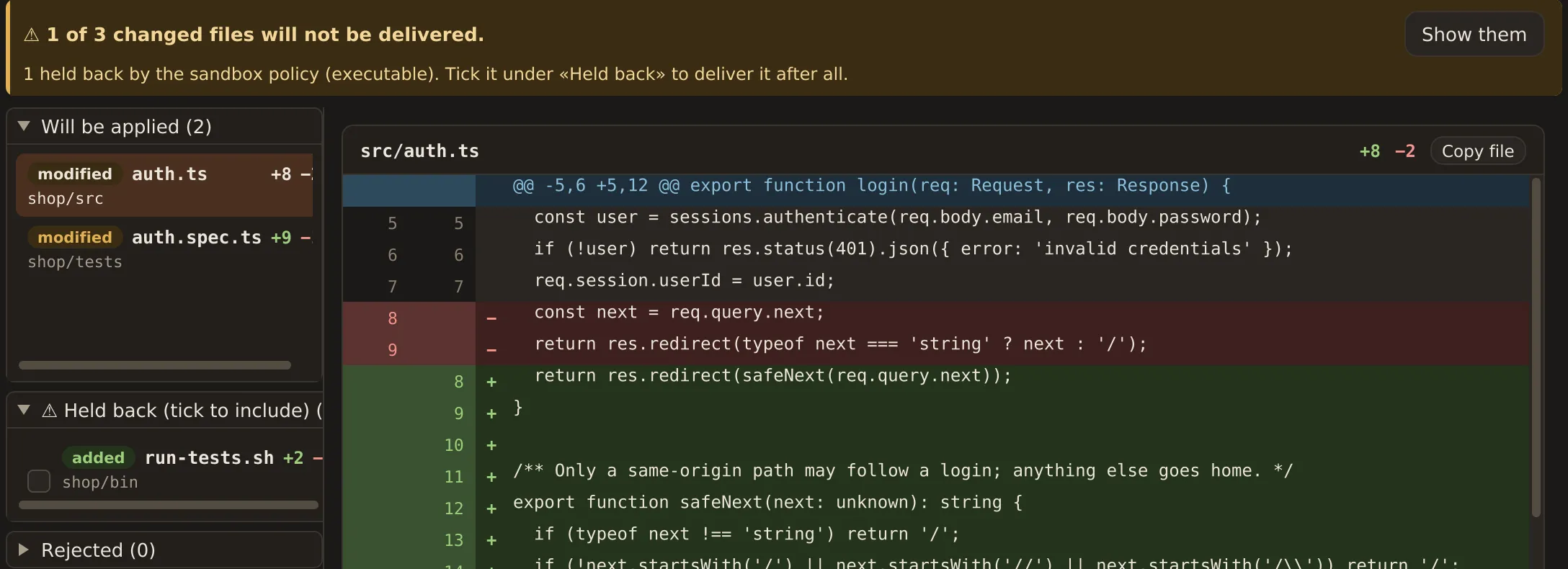
The review part of the Deliver changes dialog: a warning that one of three files is held back, the lists Will be applied, Held back and Rejected, and the diff of src/auth.ts.
The same review in the GUI: what will be applied, what is held back until you tick it, what is rejected — and the diff of the selected file beside it.

The gateway

Reach the intranet without handing over the key

Some work needs the wiki, the issue tracker or an internal API. The gateway is a sidecar that holds the credential and exposes a narrow, read-only, allowlisted view of the system. The agent gets a hostname and a 403 when it asks for something you have not allowed.

What it looks like from inside

agent GET https://wiki.gateway.local/page/48219
gateway 200 · text/markdownallowed: space OPS is on the list
agent GET https://wiki.gateway.local/space/FINANCE
gateway 403 · not allowednot allowed yet — the human must add it

the gateway answers before any upstream call

./setup.sh gateway instance add wiki --plugin confluence \
    --hostname wiki.gateway.local
printf '%s\n' "$TOKEN" | ./setup.sh gateway secret set wiki \
    --url https://wiki.example.com --token-stdin
./setup.sh gateway allow wiki add space:OPS

Every system type is a plugin

http is built in and covers any REST API behind a static secret. confluence and jira ship as jars. Your own is a class implementing GatewayPlugin plus a service entry, dropped in with gateway plugin install. The codebase ships with no systems configured — a profile pack adds what your organisation needs.

http · built in confluence.jar jira.jar GatewayPlugin · your own

What the runtime guarantees, whatever a plugin does

  • 01 Unknown hostname → 404, with no upstream call at all
  • 02 GET and HEAD only, unless the instance and the profile both allow writes
  • 03 The upstream object is pinned to one origin; .. and absolute URLs are refused
  • 04 The secret is injected by the runtime and exists as a string nowhere a plugin can read
  • 05 The item allowlist is re-read on every lookup and enforced before the handler runs
  • 06 An empty allowlist means deny everything
  • 07 no-store on every response; set-cookie and hop-by-hop headers stripped
  • 08 Masked logging: Authorization values and *_TOKEN variables are never written
  • 09 A broken instance fails alone; /healthz reports it as configured: false

The rest of it

Built to be lived in

The boundaries are the point, but a sandbox you avoid is a sandbox that protects nothing.

  1. 01

    One container per conversation

    Sessions cannot see or edit each other’s work, and resource limits mean something. Start, stop, shell in, garbage-collect the idle ones.

  2. 02

    Profiles instead of hard-coding

    Hostnames, allowlists, mirrors, CA names, protected branches, toolchains and language live in profile.json and a profile pack. No organisation is baked into the source.

  3. 03

    Toolchains as fragments

    A slim Debian base plus the fragments you pick: Java 17/21/25, Node 22, Python 3.12, Go, .NET 8, Maven, Gradle, Kotlin.

  4. 04

    Resource presets

    review (2g, 1 cpu), dev (8g, 4), build (16g, 6) — or one derived from your machine. Chosen per session, by what the session is about to do.

  5. 05

    --json on every command

    One JSON document on stdout, documented exit codes, and a line-delimited event stream from session ask. The CLI contract is the public, language-independent API.

  6. 06

    A desktop app, not a wrapper

    Nav rail, streaming chat with tool calls and usage, a file pane, a diff viewer with whole-file mode, and the same review and apply flow as the CLI — the flow itself living in the core both of them call.

  7. 07

    Pinned and reproducible

    Base image, Squid and the gateway base are pinned by digest; the agent CLI version is pinned in its fragment. doctor --deep proves the egress rules from a throwaway container.

  8. 08

    Attachments and local models

    Drop files or paste an image into the composer. Point the sandbox at Ollama, LM Studio or an MLX server on your own machine; the proxy opens just those ports.

  9. 09

    English and Norwegian

    Every user-visible string comes from a resource bundle, in the CLI and the GUI alike. --lang picks one per command.

Hardening, in one table

What is switched off, everywhere

Network
Internal network only; no default route from a session container
Capabilities
cap_drop ALL and no-new-privileges on every container, session containers included
User
Unprivileged agent user with your UID and GID, so mounted files keep their owner
Filesystem
Copied working tree; the gateway runs read-only; nothing else from the host is mounted
Package managers
Lifecycle scripts off: npm_config_ignore_scripts, YARN_ENABLE_SCRIPTS=false
git
No system config, no terminal prompt, no signing, identity fixed by the profile
Credentials
Agent credentials under state/agents/<id>/, mounted only into that agent’s containers; no tokens in .env
Branches
Protected branches from the profile plus the repository default; delivery always lands on a working branch
Images
Base image, Squid and gateway base pinned by digest; CI verifies the pins

Install

From nothing to a running sandbox

The app ships as a jpackage build with the CLI inside it, and the CLI on its own as a jlink image with its own runtime. You do not install Java.

Requirements: macOS or Linux · Podman 5+ · Java 25 only if you build from source

In the app

Install the app, and the «New sandbox» wizard takes you from nothing to a sandbox you can start a conversation in. There is nothing else to install: the CLI ships inside the app, and a sandbox made here links its own cli/ to it — so the same folder is yours to work in from the terminal whenever you want to.

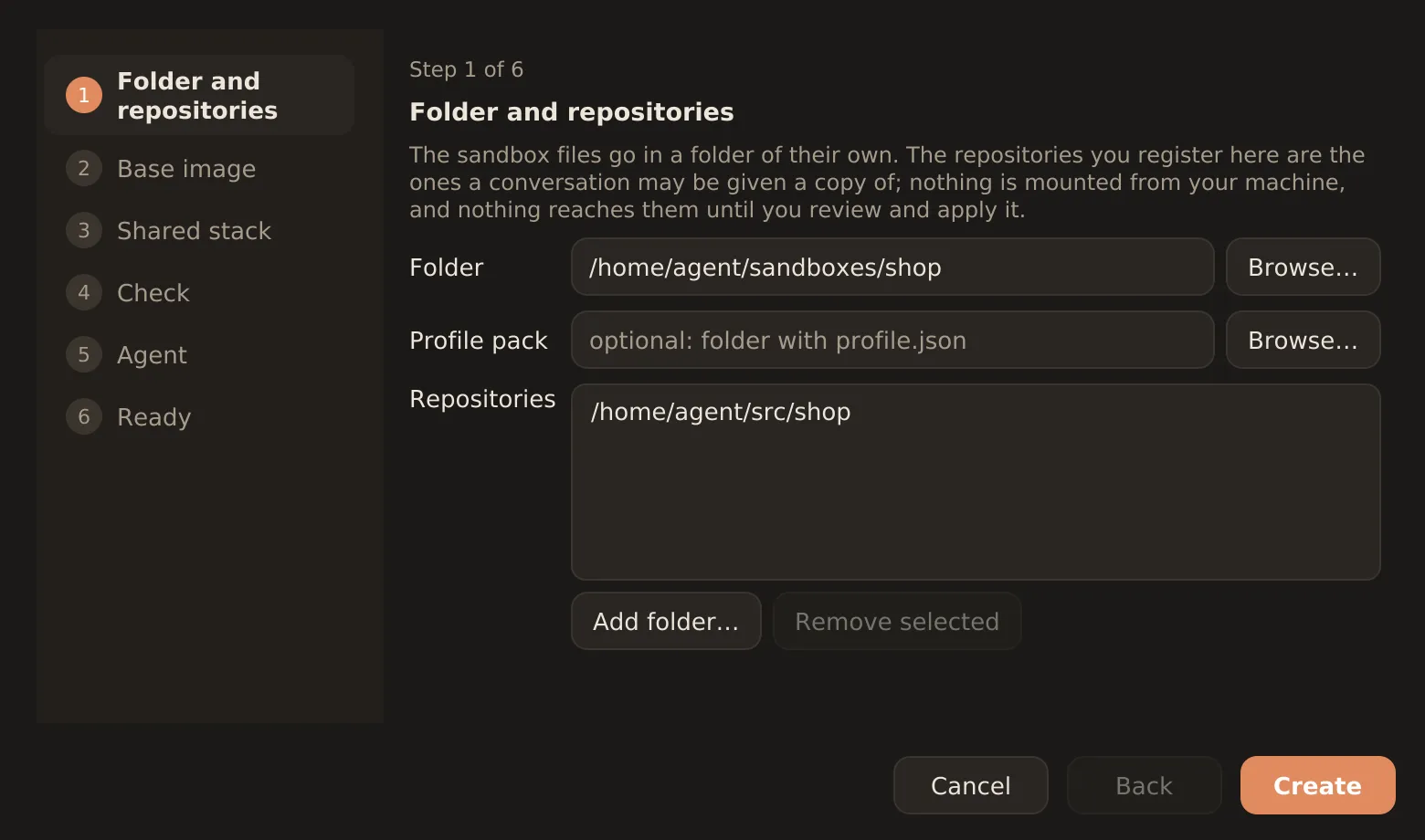
  1. Folder and repositories Where the sandbox lives, and which repositories a conversation may be given a copy of.
  2. Base image The toolchains the profile asks for and the agents it enables, built once.
  3. Shared stack The proxy and the gateway, started and left running while the sandbox is in use.
  4. Check The same checks as doctor: the container runtime, the image, the stack, the repositories and the certificate.
  5. Agent Log in once, or point the sandbox at a model server of your own. Either can wait until later.
  6. Ready The sandbox is made, and the first conversation can open as the wizard closes.
New sandbox
The New sandbox wizard: the six steps in a rail on the left, and on the first page the fields for the sandbox folder, an optional profile pack and the repositories it may copy.
Step one of six. Nothing has been made yet — «Create» writes the sandbox folder and renders its configuration, and the wizard moves on to the image.

macOS: a .dmg, opened the first time with right-click → Open, since the app is not notarised yet. Linux: a .deb or the unpacked app image. Then the conversation, the diff and the delivery are the windows above.

The app, screen by screen

Or in the terminal

Get the CLI

Create a folder, drop setup.sh in it, and let it fetch the runtime for your platform. The download is checksum-verified.

mkdir -p ~/sandboxes/shop && cd ~/sandboxes/shop# setup.sh: github.com/joachimhs/lyngvi/releases./setup.sh --download

Create a sandbox

Point it at a repository. init writes the sandbox its own launcher and a copy of the CLI.

./setup.sh init --repo ~/src/shop

Build and start

Render the config, build the image, bring up the proxy and gateway, and let doctor check the result.

./setup.sh rebuild-config./setup.sh build./setup.sh up./setup.sh doctor

Work

A conversation gets a container. Ask, read the diff, deliver what you approve.

./setup.sh agent login claude-code./setup.sh session new --title "Fix the login redirect"./setup.sh session ask 7f3a2c./setup.sh session review 7f3a2c./setup.sh session apply 7f3a2c --branch agent/fix-login

Further reading